Your AI workspace, close at hand.

Room for
your next idea.

A thought, a question, a thing to get done.
Bring it to Vibe Space — your AI workspace for learning, creating, and everything in between.

Windows & macOS Beta 0.98b

Your context,
already here.
Vibe Space
Learning buddyMemory on

I understand the idea.
Help me make it click.

Let’s find a different way in.

Think of a leaf as a tiny solar-powered kitchen. Sunlight is the energy; water and air are the ingredients.

Give me a hintTry an example
A next step,
not a loose end.
Vibe Space sprout

Example conversations

A quiet place for a busy mind.

Always within reachPersonal by designConnected to your day

From quick chat to a full workspace

Fits your desktop.
Follows your thinking.

Stay with what you’re doing. Open a quick conversation from the floating icon, then expand into your full workspace when an idea needs more room.

The full workspaceCtrlShiftSpaceOpen quick chat on Windows
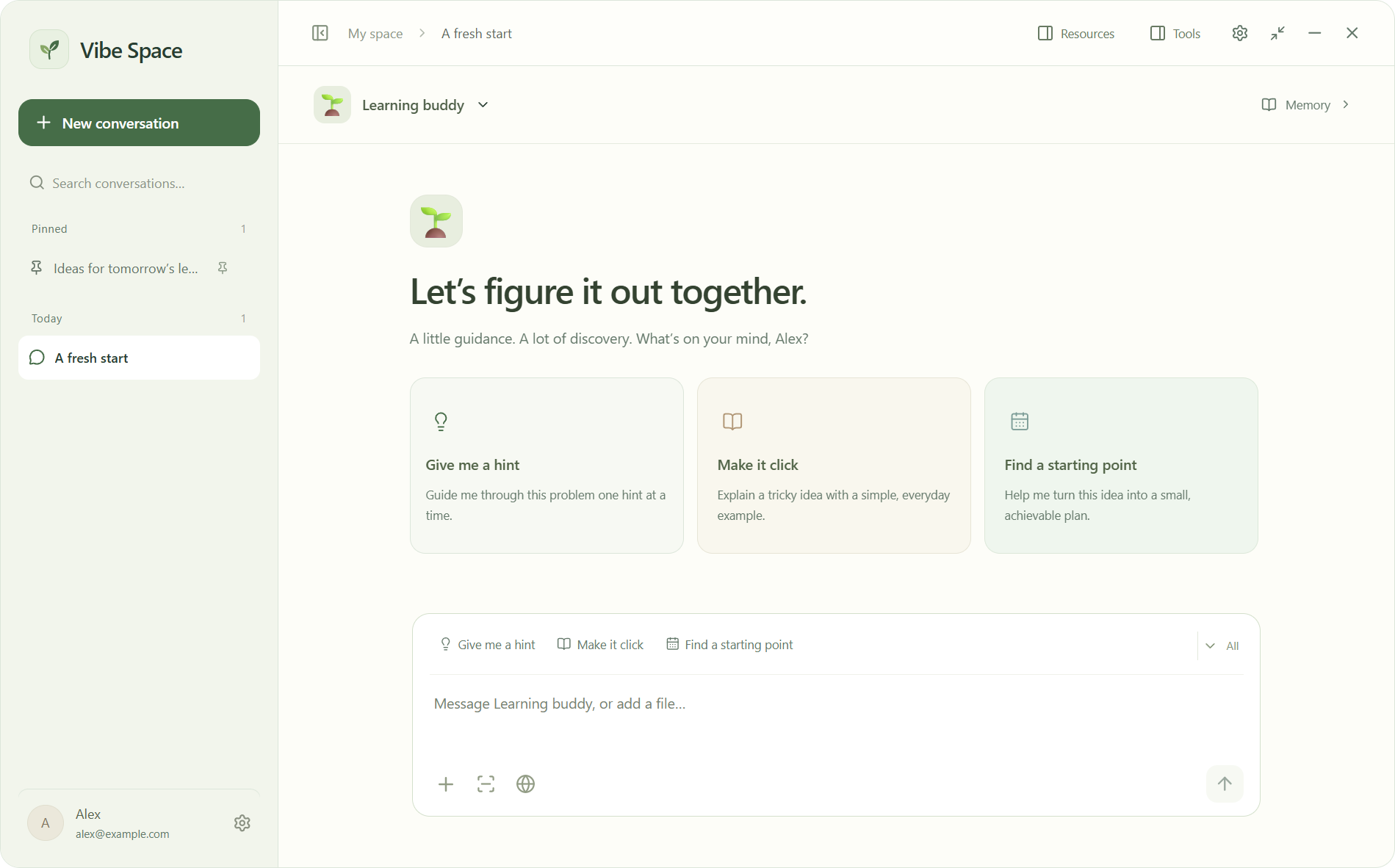
The Vibe Space desktop app: conversations on the left, a Learning buddy assistant, quick functions and a message composer.

A little presence

A floating icon keeps your workspace close without taking over the screen.

A quick conversation

Ask a question, bring in a screenshot, or pick up a thought in a compact window.

Room to go deeper

Expand to your conversations, resources and tools in the full desktop workspace.

More than a place to chat

Make it your kind of space.

Keep the useful parts together: what you’re working on, how you like to work, and what comes next.

Different hats.
Different assistants.

A learning buddy can remember how you learn. A movie assistant can remember what you enjoy. Give each assistant its own instructions, memories and quick functions, so the right context stays in the right conversation.

Learning buddy“Help me reason it out first.”
Study context
Movie assistant“Something light, no horror.”
Movie context

Separate memories for each assistant.

Show it.
Don’t re-explain it.

Bring screenshots, files and web pages into the conversation. Give your assistant the material you’re actually working with.

Good conversations
lead somewhere.

Turn a plan into a to-do, choose a reminder, and use the focus clock to make a start. AI reminders open a conversation you can continue.

Give that first draft a little polishOne small next step
Tomorrow

Reminders need Vibe Space running and online.

A little less back and forth

Bring your world
into the conversation.

Your work already lives in different places. Connect the ones you need, and give your assistant a clearer picture.

Review proposed changes before supported actions run.

Google Workspace

Find files in Drive, work with Docs and Slides, and bring Calendar into your plans.

Canvas

Ask about courses and assignments, then turn the details into a plan. Read-only access.

Your browser

Import page content and review suggested form edits with the companion Chrome extension.

Connections are optional and require your permission.

Get Vibe Space.

Choose the download that fits your computer.

No installation needed

Windows portable

Run the app directly from the downloaded EXE. No setup wizard required.

0.98b / Windows x64 / 115 MB

Download portableSettings and cache use your system user folder.
Experimental

macOS

Choose your Mac’s chip, unzip the download, and move the app to Applications.

0.98b / macOS 13 or later

Unsigned & not fully tested. No Apple Developer ID signature or notarization. macOS may block this experimental build.

Early-access builds are unsigned. Your operating system may show a security warning. An account and internet connection are required for AI features and cloud sync.

SHA-256 checksums

A few things to know

Before you settle in.

What’s the difference between installer and portable?

Both run the same app. The installer adds shortcuts and lets you choose an installation folder. Portable opens directly from the EXE. Both store settings and cache in your system user folder.

Which Mac download should I choose?

Open the Apple menu and select About This Mac. If you see an Apple M-series chip, choose Apple Silicon. If you see an Intel processor, choose Intel. Both need macOS 13 or later. These experimental builds are unsigned, not notarized, and not fully tested; macOS may prevent them from opening.

Where does my data live?

Your account and workspace data are stored in the cloud so they can sync between devices. Relevant context is sent to OpenAI when you use AI features. We do not use your data to train AI models. Read our privacy policy for the details.

How do I update an existing copy?

Choose Quit Vibe Space from the system tray before opening the new installer or portable app. Signing in reconnects you to your cloud workspace. If you uninstall on Windows, local data is kept unless you explicitly choose to clear it.

Your ideas are yours.

Your workspace syncs across devices. We use basic analytics to improve Vibe Space, never your data to train AI models.

Our privacy policy